

How to Change Apple Watch Strap Like a Pro | Easy Guide

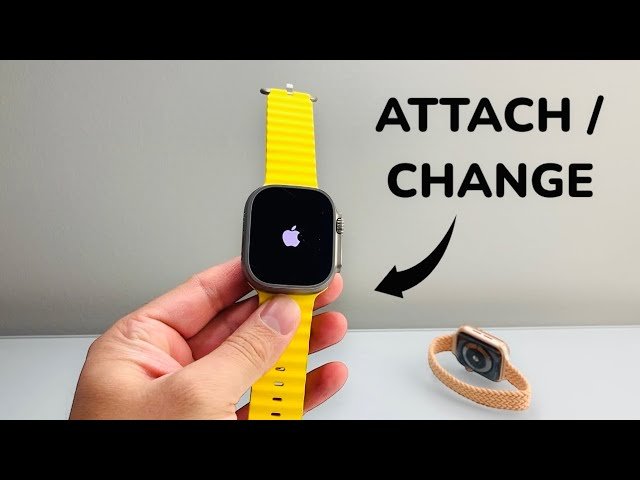
How to Change Apple Watch Strap Like a Pro | Easy Guide
Ready to refresh your Apple Watch? How to change Apple watch straps is an easy way to personalize your style for any mood or occasion. Whether it’s for comfort, workouts, or fashion, this step-by-step guide shows you how to swap bands like a pro, no tools needed. In just seconds, you’ll have a whole new look without the hassle. Let’s get started and make your Apple Watch truly yours!
Tools You Need for Changing Straps
One of the best things about how to change Apple Watch Strap is that it requires no special tools. Bestwatchstraps.co.uk has designed the watch and its bands to be user-friendly, allowing you to swap out straps with ease. However, there are a few things you might want to have on hand to ensure the process goes smoothly. First and foremost, a clean, flat surface is essential. This will give you a stable working area and prevent any small parts from getting lost.
Choosing the Right Band for Your Apple Watch
When buying a new Apple Watch band, it’s essential to match the band to your Apple Watch case size for a secure and comfortable fit. Apple Watch bands are designed to be interchangeable across models, as long as the case sizes are compatible.
Here’s a simple guide to help you choose the right band:
-
38mm, 40mm, and 41mm bands are interchangeable with each other.
-
42mm, 44mm, and 45mm bands can be used interchangeably.
-
46mm bands are compatible with 44mm, 45mm, and 46mm watch cases.
-
49mm bands work with 44mm, 45mm, 46mm, and 49mm cases, and vice versa.
This means you can use many older and newer bands with different Apple Watch generations, including the Apple Watch SE, Series 4 and later, and the original Series 1, 2, and 3. Just be sure the case sizes match.
How to Change Apple Watch Strap Safely
Ready to switch up your style? Follow these simple steps to change your Apple Watch band quickly and safely:
-
Prepare a Clean Workspace
Turn your Apple Watch face down and place it on a soft, clean surface, like a lint-free microfiber cloth or a padded mat, to protect the screen from scratches. -
If You Have a Link Bracelet
Press the quick-release button on one of the links to separate the band into two pieces before removal. -
Remove the Current Band
Hold down the band release button on the back of the watch. While holding it, gently slide the band to the side to remove it.
Tip: If the band doesn’t slide out easily, press the release button again and make sure you’re holding it firmly.
Now you’re ready to attach your new band and refresh your Apple Watch look!

When installing the new band, make sure the text on the band is facing you. Gently slide the band into the watch slot until you feel and hear a click, confirming that it’s securely in place.
Pro Tip: If the band doesn’t click or feels loose, remove it and try again, secure attachment is key for comfort and safety.

Wearing the Solo Loop or Braided Solo Loop
If you’re using an Apple Solo Loop or Braided Solo Loop, there’s no clasp or buckle to worry about. To put it on or take it off, simply stretch the band by gently pulling from the bottom and slide it over your wrist.
Note: The band is designed to stretch comfortably, but always handle it gently to maintain its shape and durability.

Using the Milanese Loop Band
If you have an Apple Watch Milanese Loop, the way you remove or adjust it may depend on the version:
-
2018 and newer models: You can fully open the band by sliding the magnetic closure through the band connector (lug). This makes it easy to remove or replace the band.
-
Earlier models: The magnetic closure does not slide through the lug, so you’ll need to remove the band without detaching it entirely.
Tip: To check your model, look for the year of purchase or inspect the band’s design closely.

Using the Ocean Band, Alpine Loop, and Trail Loop with Apple Watch Ultra
The Ocean Band, Alpine Loop, and Trail Loop are premium 49mm bands specifically engineered for the Apple Watch Ultra and Apple Watch Ultra 2. These rugged bands are ideal for high-intensity and outdoor activities like hiking, trail running, climbing, kiteboarding, diving, and more.
For a Secure Fit:
-
Align the band edge (lug) so it sits parallel to the watch case.
-
With the metal tooth facing downward, gently push the lug into the case until it locks into place.
Compatibility Note:
-
Apple Watch Ultra is also compatible with 45mm bands, but these are best suited for casual, everyday use rather than active or extreme conditions.
Thinking of Using a Solo Loop or Braided Solo Loop with Apple Watch Ultra?
Due to the larger case size of the Ultra, you may need to size down compared to what you wear on other Apple Watch models. Always try on the Solo Loop or Braided Solo Loop with your Apple Watch Ultra before purchasing to ensure the best fit.
How to Adjust the Modern Buckle on Your Apple Watch
The Modern Buckle band is both stylish and functional, and it’s easy to adjust for a perfect fit.
-
To open the band, press the release buttons located on each side of the magnetic closure.
-
Use the adjustment holes to resize the band to your wrist.
-
To close it, align the two-piece magnetic closure until it clicks securely into place.
Tip: Make sure the band is snug but comfortable for all-day wear.
How to Remove the Apple Watch Link Bracelet Safely
The Link Bracelet requires a few extra steps for safe removal. Follow these instructions to avoid damaging the band or watch:
-
Separate the Bracelet
Press the quick-release button on a link to split the band into two pieces. This is essential before sliding the band out. -
Close the Butterfly Clasp
If it’s open, fold in each side of the butterfly closure one at a time. You’ll hear a click when it locks into place.
Remove the Band
Slide each piece of the band out while holding down the band release button on the back of your Apple Watch.
Important: Do not twist or force the band; this can cause damage.

How to Use the Quick Release Button on the Link Bracelet
To detach the Link Bracelet from your Apple Watch:
-
Locate the quick-release buttons on the inside of the bracelet links.
-
You only need to press and hold one button to separate the band into two pieces.
Tip: Always handle the band gently and avoid forcing it to prevent damage to the links or connectors.

Separate the Link Bracelet Before Removing
To safely take off your Apple Watch Link Bracelet:
-
Hold down the quick release button located on the inside of the bracelet.
-
While holding the button, gently pull the links apart to separate the band into two pieces.
-
Always separate the band before removing it from your Apple Watch to prevent damage to the clasp or connectors.
Reminder: Avoid twisting or forcing the band, gentle pressure is all you need.

How to Remove Your Apple Watch Band
To take off your current band:
-
Hold down the band release button located on the back of your Apple Watch.
-
While pressing the button, gently slide the band to the side to remove it from the watch case.
Tip: If the band doesn’t slide out easily, make sure you’re holding the release button down firmly before trying again.

How to Adjust the Titanium Milanese Loop on Your Apple Watch
Adjusting the Titanium Milanese Loop is quick and easy for a secure and comfortable fit:
-
Lift the clamp on the buckle to unlock it.
-
Place one finger on each side of the buckle and slide it to your desired position, keeping the buckle parallel to the band as you adjust.
-
Once it’s in place, press down to close the clamp and lock the band securely.
Tip: Ensure the buckle lies flat and evenly aligned for the best fit and finish.

Tips for Maintaining Your Apple Watch Straps
Proper maintenance of your Apple Watch straps can extend their lifespan and keep them looking new. Different materials require different care, so it’s essential to understand how to clean and maintain each type of strap. For silicone and sport bands, regular cleaning with a mild soap and water solution can remove dirt, sweat, and oils. Rinse the strap thoroughly and dry it with a soft cloth to prevent any residue buildup.
Leather straps require a bit more care to maintain their appearance and durability. Avoid exposing leather straps to water, as moisture can damage the material. Instead, use a damp cloth to gently wipe away any dirt or stains. For deeper cleaning, use a leather conditioner or cleaner specifically designed for watch straps. Apply the conditioner sparingly and follow the manufacturer’s instructions to keep the leather supple and prevent cracking.
Metal and woven nylon straps are relatively low-maintenance but can still benefit from occasional cleaning. Use a soft brush or cloth to remove any debris or dust from metal links or woven fibers. For metal straps, a mixture of warm water and mild soap can help remove any grime. Rinse thoroughly and dry with a soft cloth to avoid water spots. By following these maintenance tips, you can ensure that your Apple Watch straps remain in excellent condition and continue to enhance the look of your device.
Conclusion and Final Thoughts
“How to change Apple Watch” strap is an easy and rewarding way to personalize your device and keep it looking fresh. With the right tools, a bit of practice, and an understanding of the different strap options available, you can effortlessly swap out bands to match your mood, outfit, or activity. Whether you prefer the sporty look of a silicone band, the elegance of a leather strap, or the modern appeal of a stainless steel link, there’s a strap out there to suit your needs.
By following the step-by-step instructions provided in this guide, you can change your Apple Watch straps like a pro in just a few minutes. Remember to take care of your straps by following the maintenance tips, ensuring they remain in excellent condition and continue to enhance the look of your watch. With so many styles and materials available, you can build a collection of straps that allows you to customize your Apple Watch for any occasion.
In the end, the ability of how to change Apple Watch strap easily and quickly adds a new dimension to your watch-wearing experience. It empowers you to express your personal style and adapt your watch to different situations, making it a truly versatile accessory. So go ahead, explore the world of Apple Watch straps, and enjoy the endless possibilities for customization. Your Apple Watch is more than just a device; it’s a reflection of your unique style and personality.